- Developer
- Mattel Game Studios HK Limited
- Installs
- 100M+
- Downloads
- 0
- Views
- 11
- Updated
- Oct 14, 2026
Screenshots
About UNO!™
UNO Mobile Game: Modes, Features, and How to Get Started
Remember the last family game night when someone slapped down a Draw Four and the whole room erupted? That feeling is now available on your phone. The UNO mobile game takes the classic card game off the kitchen table and lets you play with friends, family, or strangers anywhere. This guide covers how it works, what each mode offers, and a few tips to help you win more rounds.
What Is the UNO Mobile Game?
The UNO mobile game is a digital version of the well-known card game where the goal is to empty your hand first. You match cards by color or number, use action cards to disrupt opponents, and call out "UNO" when you're down to your last card. The app adds online matches, tournaments, and social features on top of the familiar rules.
Who Can Play?
The game is designed for everyone, from long-time fans to people who've never touched a deck. Because the rules are simple and the app guides you through a match, it works well for families with mixed ages. You can jump in alone for a quick game or invite friends to join a private match.
How Does UNO Work on Mobile?
Each match plays out in real time against other players online. You tap cards to play them, draw when you can't match, and watch for special cards like Skip, Reverse, and Wild. The app handles the rules automatically, so you can focus on strategy rather than arguing about whether a move was legal.
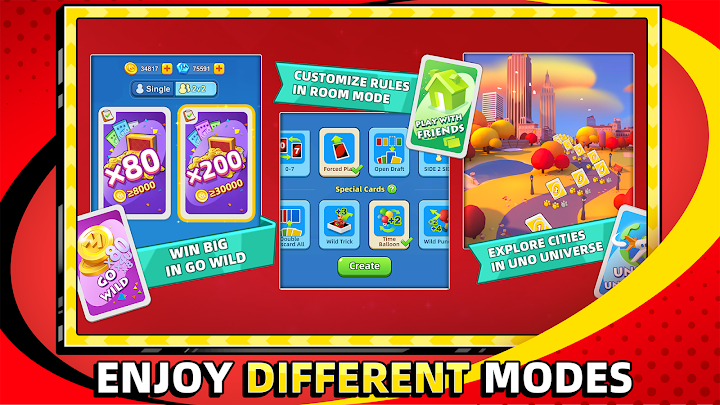
Quick Play and House Rules
Tapping Quick Play starts a new game using classic UNO rules, which is perfect when you only have a few minutes. If you want something different, you can choose from a range of house rules and shape the game your own way. This flexibility helps keep long-time players from getting bored.
Key Game Modes and Features
The app goes well beyond a single card game. Here's a look at the main ways to play.
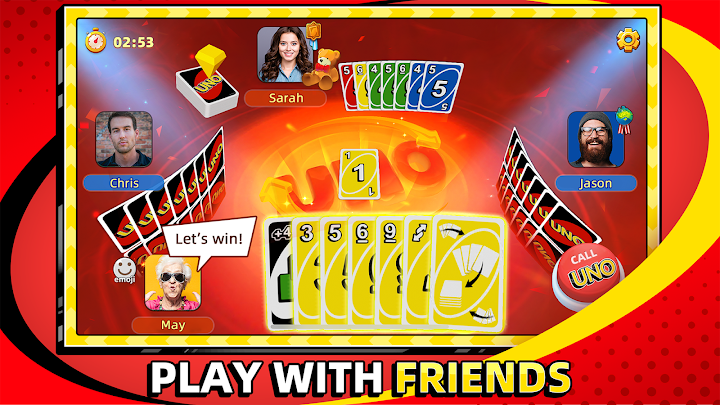
Play With Friends and Family
You can set up a private match, apply your own house rules, and invite people to join. It's an easy way to keep a family or friend group connected, even when everyone is in a different city. Clubs let you chat with your buddies and send each other gifts as well.
Buddy Up (2v2 Mode)
In this team mode, you partner with a friend or family member and compete against another pair. The aim is to help each other get your hands down to zero as quickly as possible. Good communication and smart card choices make a huge difference here.
Go Wild Mode
Go Wild is the most chaotic option, built around house rules and two decks of cards. According to the developers, it offers in-game winnings that can reach up to 600 times your stake, but it's also a high-risk mode where you can lose it all. It's best treated as a bit of extra fun rather than your main way to play.
Tournaments, Events, and Leaderboards
World Series tournaments and special events give you reasons to keep coming back. You can earn free rewards, climb the leaderboards, and compare your progress with friends. A daily spin of the wheel also offers a chance at free rewards.
UNO Championship Series
The app has also featured the UNO Championship Series, an official competition with digital qualifier tournaments. Players who completed all three qualifiers could earn a spot as a finalist, with a shot at the title of UNO World Champion. The listing noted that entry was open to adult legal residents of the 50 US states and DC and that qualification rounds ended on 9/26/26, so check the official rules page for current details.
How to Get Started
1. Download the UNO mobile game from your device's app store.
2. Open the app and tap Quick Play to learn the basics.
3. Try a few matches with classic rules before experimenting.
4. Invite friends or family to a private game with your own house rules.
5. Join a club to chat and exchange gifts.
6. Check daily for spins, events, and tournament invitations.
> Tip: Don't forget to call "UNO" before your opponents do. A missed call can cost you the match.
Tips for Winning More Games
A few small habits can improve your results fast. Save your Wild cards for tricky moments rather than playing them early. Track which colors your opponents avoid, since that hints at what they're holding. In team mode, plan ahead with your partner and focus on whichever hand can finish first.
Pros and Cons
Pros
- Familiar rules that are easy to learn
- Real-time matches with players worldwide
- House rules, team play, and several game modes
- Free daily rewards, events, and tournaments
- Great for staying connected with family and friends
Cons
- Go Wild mode is risky, and you can lose your in-game winnings
- Online play depends on a stable internet connection
- Competitive tournaments can be tough for casual players
FAQs
Is the UNO mobile game free?
The app is free to get started with, and it includes free daily rewards and events. Check the app store listing for any in-app purchases.
Can I play UNO with friends online?
Yes. You can set up private matches, apply your own house rules, and invite friends and family to play.
What is Buddy Up mode?
It's a 2v2 team mode where you and a partner compete against another team to empty your hands as fast as possible.
What is Go Wild mode?
It's a high-stakes mode with house rules and two decks, where you can win big in-game rewards or lose everything you put in.
Final Thoughts
The UNO mobile game keeps everything people love about the classic card game and adds modern touches like online tournaments, clubs, and team play. Whether you want a quick round on your commute or a full game night with relatives across the world, there's a mode that fits. Start with Quick Play, learn the rhythm of the game, and don't forget to shout UNO at the right moment.